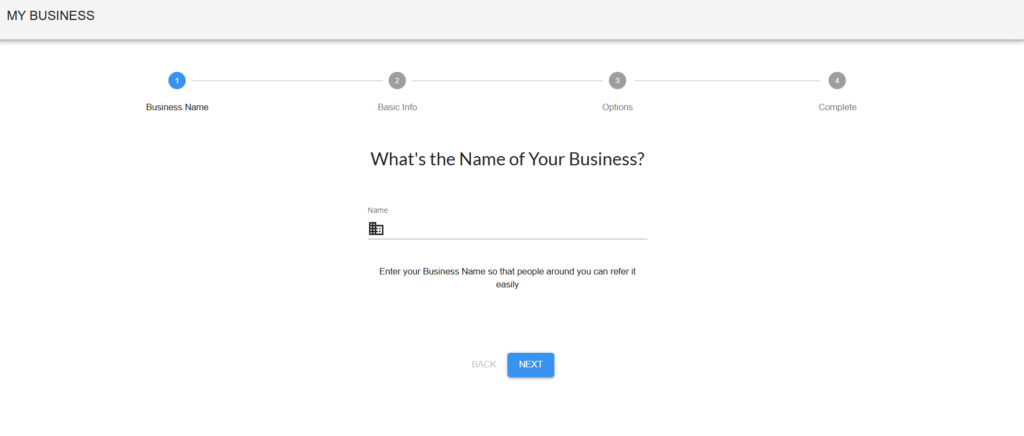
This is the first step in the “My Business” setup process. In this step, you will provide the name of your business. This name will be used for identification across the platform and will help others recognize your business easily.
Progress Tracker
At the top of the page, you’ll find a 4-step progress tracker:
Business Name – (Current Step)
Basic Info
Options
Complete
🔵 The current step is highlighted in blue, while the others are shown in grey until reached.
Example Inputs:
“BluePeak Solutions”
“SunnySide Cafe”
“TechTrail Innovations Pvt Ltd.”
✅ Tip: Keep the name short and memorable.
Input Guidelines
Mandatory Field: This field must be completed to proceed.
Character Limit: Try to keep it under 50 characters for optimal visibility.
No Special Characters: Avoid using special symbols except for standard punctuation (e.g., hyphens or apostrophes if needed).
Uniqueness: Ensure the name does not conflict with other registered businesses on the platform.
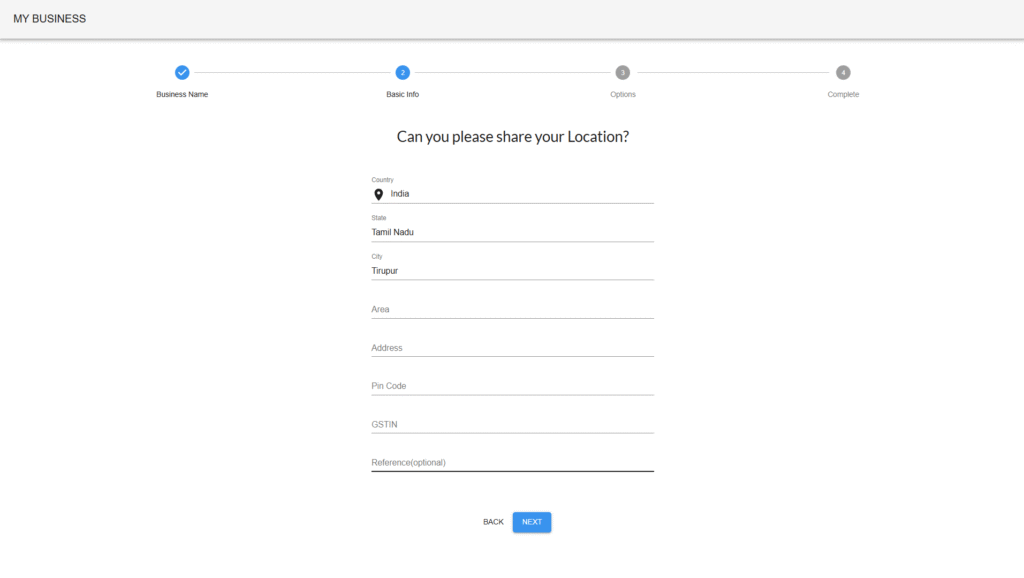
This step allows you to provide the physical location and official registration details of your business. These details ensure accurate listing, correspondence, and legal compliance.
Progress Tracker:
✅ Business Name (completed)
🔵 Basic Info (current step)
⚪ Options
⚪ Complete
You will be asked to provide the following information:
Mandatory Fields
Field
Description
Example
Country
Automatically detected or selected country.
India
State
State where the business operates.
Tamil Nadu
City
City where the business is located.
Coimbatore
Area
Locality or neighborhood.
Avinashi Road
Address
Full street address including building and landmarks.
🔒 Note: GSTIN is required for businesses registered under the Goods and Services Tax framework in India.
Optional Fields
Field
Description
Example
Reference (optional)
Internal reference, partner code, or referral name if applicable.
Referred by Rajesh Kumar
Input Guidelines
Ensure accuracy in postal address and GSTIN.
Use only alphanumeric characters where applicable.
Address should be clear for easy identification and delivery.
Pin Code must be valid for the selected city and state.
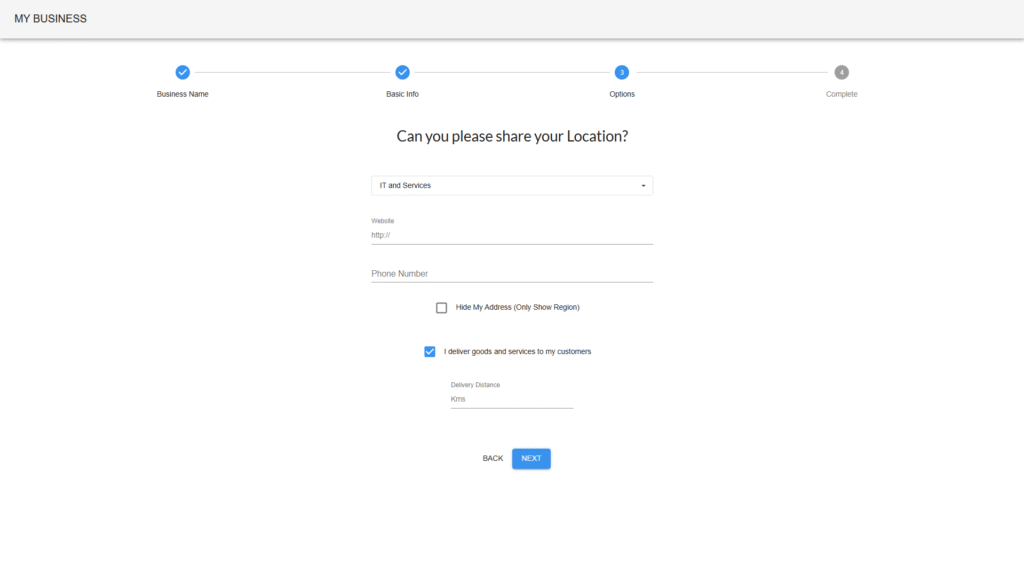
This step captures your business category, how you operate, and your contact options to help customers find and interact with your business effectively.
Progress Tracker:
✅ Business Name
✅ Basic Info
🔵 Options (current step)
⚪ Complete
Category
Dropdown menu: Choose the industry that best describes your business. Example: IT and Services, Retail, Manufacturing, Healthcare.
Website(Optional)
Enter your business website URL. Example: http://www.mybusiness.com Use the full URL with http:// or https://.
Phone Number
Enter a valid phone number for customer inquiries. Example: 98765 43210
Visibility Settings
☐ Hide My Address (Only Show Region)
When checked, only your city or region will be visible on public listings.
Useful for home-based or service-only businesses.
Delivery Option
☑ I deliver goods and services to my customers
Indicates whether you provide delivery or on-site service.
Delivery Distance(Shown only if delivery is checked)
Enter how far (in kilometers) you deliver. Example: 10 (for a 10 km delivery radius)
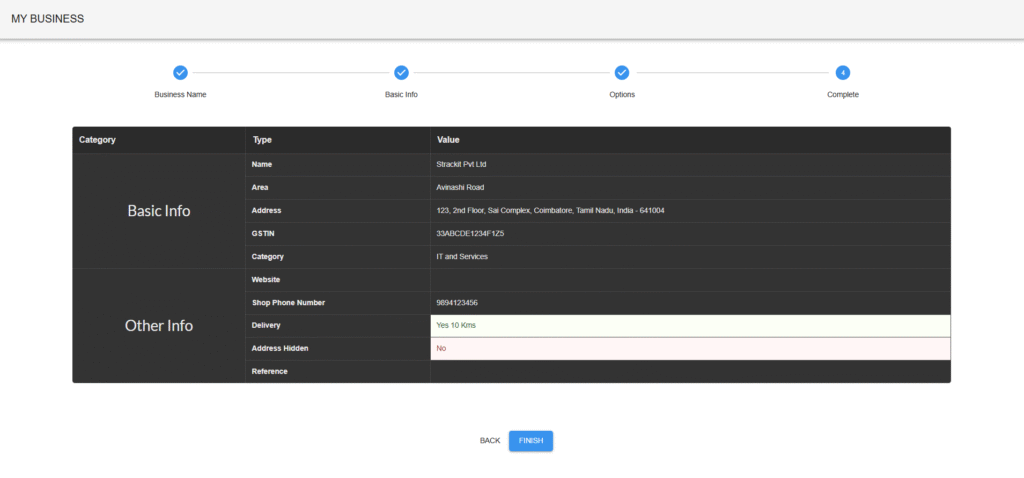
This is the final step in your business registration process. It allows you to review all entered details and confirm before submission.
Progress Tracker:
✅ Business Name
✅ Basic Info
✅ Options
🔵 Complete (current step)
The screen is divided into two main sections:
Basic Info
Name: Registered name of your business
Area: Local area or locality
Address: Complete business address with pin code
GSTIN: Government-issued GST number
Category: Business type (e.g., IT and Services)
Other Info
Website: Your website URL (if provided)
Shop Phone Number: Primary contact number for customers
Delivery: Indicates if you deliver to customers and delivery range (e.g., Yes – 10 Kms)
Address Hidden: Yes or No, based on privacy settings
Reference: Optional reference or identifier (if entered)
Complete your Setup
Double-check contact and GST details for accuracy.
If you need to update something later, contact support or access the profile editor.
Click FINISH only when you’re confident all the details are correct.